
How Laetoly Parses G-code for Preview: Worker Flow, Modal Motion, and Known Limits
Explain one G-code parsing or toolpath behavior that the current source snapshots can prove.
Table of Contents▼
G-code parsing is not one universal operation. A program can contain text recognition, modal state, coordinate interpretation, geometry construction, and controller-specific behavior. This article describes only what the current Laetoly source evidence shows at three entry points: a frontend preview Worker, a Java backend parser, and a Python toolpath command. The available records are static source snapshots. They do not establish that these paths share one runtime pipeline or that a particular file will machine correctly.
The frontend preview starts in a Worker
In the web frontend, the G-code preview component does not parse a program on the main page thread. It starts a separate Web Worker that is dedicated to parsing, routes the Worker's messages back to the component, and includes an error path: when the Worker reports an error, the pending parse request is rejected instead of being left open. This is evidence of a browser-side boundary. Parsing work sits behind a message interface, and the page that draws the preview only exchanges messages with it.
That source review does not by itself show the complete lifecycle of a parse request, every message shape, or the correctness of the geometry eventually displayed. Those require a browser fixture and runtime checks. The source record also notes that the handling of Worker results still needs to be checked before claiming rendered geometry correctness.
The Worker initializes parsing state
Inside the Worker, the parsing routine first counts the input lines, chooses a validation mode, creates a validator, and sets up its parse state. That state starts from default positioning, unit, and feed-rate settings, and prepares separate collections for parsed points and for path segments that are still being assembled. These details describe how this routine starts; they do not prove that all G-code dialects, setup blocks, or later state transitions are represented.
The validator is configured with coordinate and laser-power limits. Those limits belong to this code snapshot, not to a universal machine envelope, safety limit, or product specification. They should not be copied into a machine setup guide or presented as supported travel dimensions. The evidence is static, and the repository snapshot is marked dirty, so these observations need a version review before publication as a release guarantee.
The distinction between text parsing and machine semantics matters. Recognizing a motion word or maintaining a parse state is only one part of deciding what a controller will do. A preview can visualize a recognized path without proving that the target machine accepts every command, offset, or mode in the file. The available evidence explicitly separates recognized command words from complete machining semantics.
The backend parser tracks a narrower modal state
The Java backend has its own parser. Empty or blank input produces no commands. For other input, the parser keeps a unit mode and a modal motion value, splits the program into lines, removes comments, breaks each line into words, and inspects the G-code values it finds. It treats G20 and G21 as inch and millimeter modes, and it remembers G0 or G1 as the modal motion to apply to later lines that contain only coordinates.
The same parser clears the remembered linear motion when it encounters G2, G3, or G80. The source documents why: arc interpolation is not yet supported, and clearing the remembered motion avoids treating later arc coordinates as a straight line. That is a useful example of a parser limitation being handled explicitly: a command can be recognized while its full motion semantics remain unsupported.
In this narrow example, “modal” means the parser carries a motion choice forward when a later coordinate block omits the motion word. It does not mean that every modal code is implemented. The source names the specific G0 and G1 behavior it retains and the G2, G3, and G80 cases that clear it. A technical explanation should keep that list explicit rather than shorten it to “Laetoly supports modal G-code” without saying which modes and which parser.
The unit state is another distinct part of the parser. It starts in millimeter mode and changes when the parser sees G20 or G21. Units affect how values are interpreted; they are not the same state as the remembered motion word. Keeping those two pieces of state separate when reading the parser helps avoid treating every G-code word as if it changed the same part of the parser.
The code evidence supports a statement about how this parser splits input into words and decides modal motion. It does not prove complete conformance to a G-code standard, compatibility with every controller, or correct machine execution. The Java parser is a separate evidence record from the frontend Worker, so matching behavior on the same words in both places is not sufficient proof that the two implementations behave identically.
The driver exposes a toolpath-generation entry point
The local driver, written in Python, has a command whose stated purpose is converting SVG input into a G-code toolpath. The inputs it declares cover tool dimensions and type, cut type and depth, feed and plunge rates, spindle speed, safe height, optimization and simplification options, milling direction, and additional finishing or pocket settings. In other words, the driver takes a drawing plus machining choices and is responsible for producing the program, while the web preview and the backend parser consume programs.
This is evidence of an interface and its declared inputs. The reviewed source does not show the complete geometry calculation, every branch, the resulting G-code, or a comparison against a physical cut. It therefore supports a source-navigation article about the command boundary, but not a claim that a specific parameter combination produces a safe or accurate toolpath.
Keep the three paths separate in explanations
The evidence pack covers the frontend Worker, the backend parser, and the driver's toolpath command. They represent distinct source entry points. A diagram or article should label them as separate inspected paths unless runtime tracing proves how a particular product workflow connects them. Showing a simple arrow from the Python toolpath generator into the browser Worker would imply a call relationship that the current snapshots do not demonstrate.
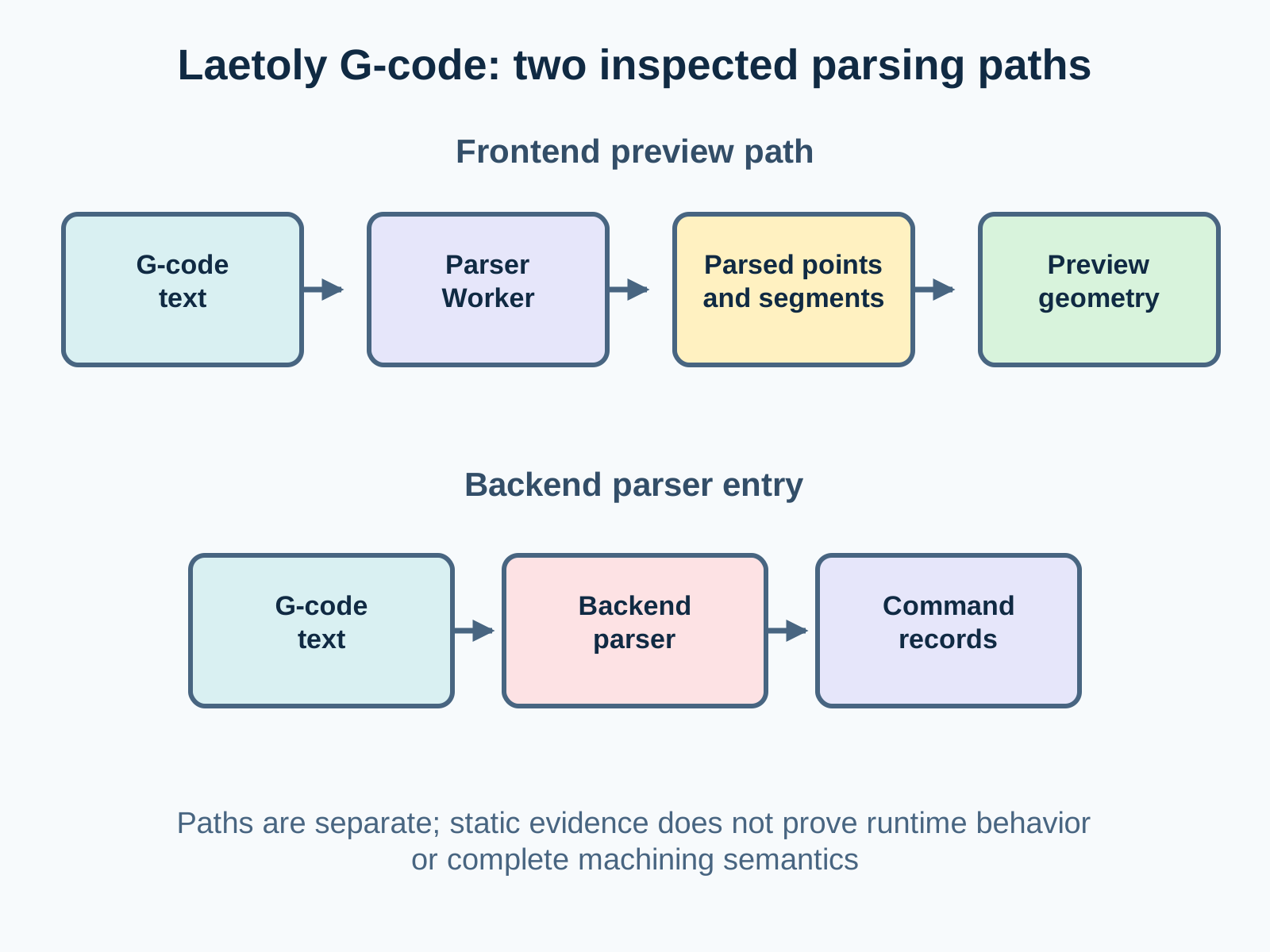
This boundary is useful to engineers because it directs the next investigation. To establish an end-to-end contract, capture the actual UI request, the Worker input and output, any backend parsing request, and the driver's generated artifact. Then compare the same sample program across these layers and record the source revisions used. Until that work exists, keep conclusions tied to the part of the source that supports them.
What stronger runtime evidence would add
A browser fixture could send a small, known G-code file through the frontend preview component and record the Worker request, response, errors, and resulting geometry. That would test the path from UI to preview for the specific browser build and input. It would not automatically prove that the backend Java parser or the Python driver uses the same rules.
The backend needs its own focused parser fixture. Cases should include a line that sets a motion word, a following coordinate-only line, a unit change, and an unsupported arc followed by another coordinate block. The expected result should be checked against the current parser source and whatever public behavior the project intends to support. A result from one fixture is evidence about those cases only; it is not a standards-compliance claim.
The driver needs a separate SVG input and generated-output check. Record the selected tool and operation settings, inspect the generated file, and compare it with a controlled expected shape. A physical cut would be a further validation step with a particular machine, material, tool, and setup. The present review of the command's entry point does not include such a test result, so this article makes no claim about cut quality.
When these checks are performed, save the input, output, source revision, and test conditions together. If a source file changes, review the article against the new version before treating its description as current. The evidence pack already records the repository revision, dirty state, file fingerprint, and source location for each selected record; these fields help identify exactly which snapshot a statement describes.
A safe way to read parser evidence
When reviewing a parser, separate five questions:
- Recognition: Which words or command families does the parser inspect?
- State: Which units, modes, or modal motion values does it retain?
- Geometry: Which points or segments are actually produced, and under what conditions?
- Validation: Which checks can reject or limit input, and are their bounds product defaults or machine-specific values?
- Execution: Has the same file been verified in the target controller and machine setup?
The records described here answer parts of the first two questions and expose some interfaces. They do not close the geometry and execution questions. The frontend evidence calls for a browser fixture before asserting rendered geometry correctness; the backend source documents an unsupported arc-interpolation case; the driver evidence covers only the command's entry point.
What this article does not claim
This source walk-through does not claim parser performance, standards compliance, complete arc support, machine compatibility, controller safety, or a verified machining result. It does not treat a supported-command list as proof of full semantics. It also does not turn a dirty source snapshot into a promise about every released build.
Those limits are part of the technical result. A careful parser article should explain what the available source proves, show where the evidence stops, and leave runtime behavior open until it has been tested with a controlled fixture. For CNC software, that distinction helps readers understand how the software is organized without mistaking a static source review for a machine test.