
Properties
Updated 2025-11-05
Device Tab
Device Info
- Device Name: laser
- Connection Status: DISCONNECTED
- Communication Method: USB / WIFI (optional)
Connection Settings
- Port Selection: Choose a port from the dropdown menu
- Connect Button: Click “Connect” to establish connection
Movement Control
| Control Item | Value | Unit |
|---|---|---|
| Step Distance | 5.0 | mm |
| Movement Speed | 500 | mm/min |
- Direction Control Buttons:
- X+ / X−
- Y+ / Y−
- Z+ / Z−
Position Display
- Work Position: X: 0, Y: 0, Z: 0
- Machine Position: X: 0, Y: 0, Z: 0
Other Control Buttons
- Home: Return to origin
- Hold: Pause operation
- Unlock: Unlock the device
- ResetXY: Set current XY as work origin
- ResetZ: Set current Z as work origin
- Spindle: Spindle On/Off (Click to turn on or off)
- LaserOn: Laser On/Off (Press and hold to turn on, release to turn off)
CNC Tab
Material & Tool Selection
- Material: Pine
- Tool 1: 1/16 in Flat Cutter
- Tool 2: 1/16 in Flat Cutter (disabled)
Machining Parameters
| Parameter | Value | Unit |
|---|---|---|
| Cutting Depth | 5 | mm |
| Feed Rate | 1100 | mm/min |
| Z Feed Rate | 300 | mm/min |
| Spindle Speed | 12000 | RPM |
| Depth per Pass | 1 | mm |
Path Type
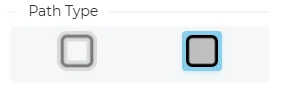
- Stroke
- Fill
Laser Tab
Material & Layer Settings
- Material: Pine
- Layer ID: 01
- Mode: Fill
Engraving Parameters
| Parameter | Value | Unit |
|---|---|---|
| Speed | 6000 | mm/min |
| Power | 20 | % |
| Passes | 1 | times |
| Line Interval | 0.1 | mm |
Path Type
- Stroke
- Fill
Tabs Setting
- Enable Tabs: Disabled