
Welcome to Laetoly
Updated 2026-09-14
About Laetoly
Laetoly — Turn your maker dream into reality. Laetoly is dedicated to empowering hobbyists, makers, and workshops with intuitive, all‑in‑one CNC software that transforms ideas into finished creations seamlessly. The platform covers the entire journey of design, making, and sharing, providing a complete workflow in one place. With support for mainstream CNC controllers and a wide range of toolpaths, Laetoly integrates AI‑powered features, rich template libraries, and smart parameter settings—making it easy for beginners to get started while enabling professionals to create with efficiency and precision. Through its unified “Design · Make · Share” experience, Laetoly is inspiring creators worldwide to truly Create without limits.
Sign Up & Sign In
Registration Process
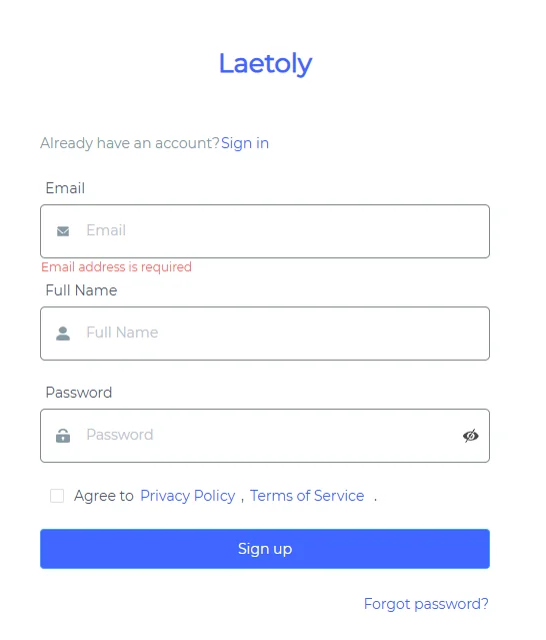
- Open the Laetoly registration page.
- Fill in the following information:
- Full Name
- Password
- Check the box to agree to the Privacy Policy, the Terms of Service and the Acceptable Use Policy (AUP).
- Click the
Sign upbutton to submit your registration. - The system will send a verification email to the address you provided.
- Open the email and click the verification button to be redirected to Laetoly and automatically complete registration and login.
Login Process
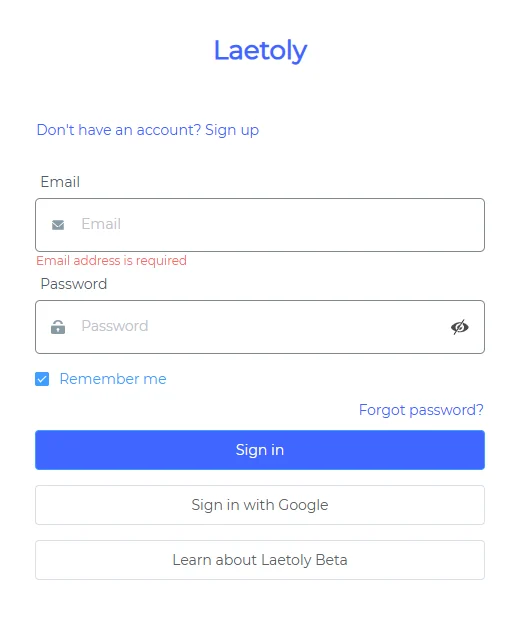
Option 1: Email Login
- Open the Laetoly login page.
- Enter your Email and Password.
- Optional: Check
Remember meto stay signed in. - Click the
Sign inbutton to log in.
Option 2: Google Login
- Click the
Sign in with Googlebutton. - The system will automatically register and log you in using your Google account—no additional information required.
Frequently Asked Questions
- Forgot your password? Click the
Forgot password?link to reset it. - Already have an account? Click
Signon the registration page to go to the login screen. - Don’t have an account? Click
Sign upon the login page to go to the registration screen.