
G-code Console
Updated 2025-11-03
G-code Console Guide
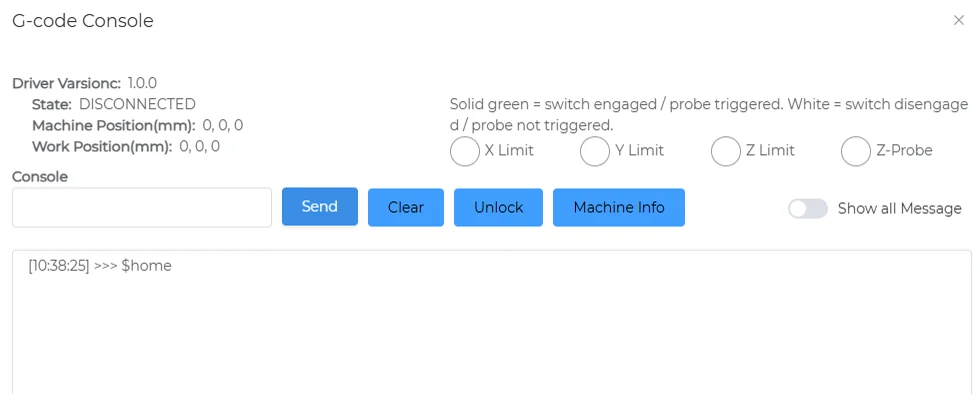
Basic Info
- Driver Version:
1.0.0 - Connection Status:
DISCONNECTED - Machine Position (mm):
X: 0,Y: 0,Z: 0 - Work Position (mm):
X: 0,Y: 0,Z: 0
Control Buttons
| Button Name | Description |
|---|---|
Send | Send G-code commands to the device |
Clear | Clear console messages |
Unlock | Unlock the device and clear alarms |
Machine Info | Display detailed device information |
Message Display Options
Show all Message: Toggle to show or hide all console messages
Status Indicators
Color indicators reflect the state of limit switches and probes:
- Solid Green: Switch or probe is triggered
- White: Switch or probe is not triggered
Limit & Probe Status
X Limit: X-axis limit switch statusY Limit: Y-axis limit switch statusZ Limit: Z-axis limit switch statusZ-Probe: Z-axis probe status
Console Command Example
You can enter G-code commands at the bottom of the console, for example:
[10:38:25] >>> $home