
Device Operation
Updated 2026-09-14
This guide helps end users safely complete common machine operations in the current project. Follow the steps—no technical background required.
How to Set the Work Origin (Zero Point)
- Purpose
- The work origin is the starting and reference position for this job, ensuring the machine begins from your specified point.
- Steps
- Place the material steadily, clear the workspace, and ensure no clutter nearby.
- Open Laetoly, connect the device in the right-side Device panel, then start debugging.
- Move the tool to the desired starting position (typically a suitable corner or the center of the material).
- Click
 to set the work origin.
 - Run a small test (e.g., slight movement) to confirm the machine uses that point as the reference.
- Tips
- After changing materials or moving fixtures, set the work origin again.
What Is Probing? Why and How to Do It
- Concept
- Probing determines the relative position between the tool and the material surface so the machine processes at the intended depth.
- Why Probing
- Ensures proper depth, avoids overcutting or undercutting, and improves consistency of finished results.
- Steps (Simplified)
- Stop machine movement and keep it stationary.
- In the “Start carving” dialog ! when the machine is IDLE, click the Probing button to perform probing.
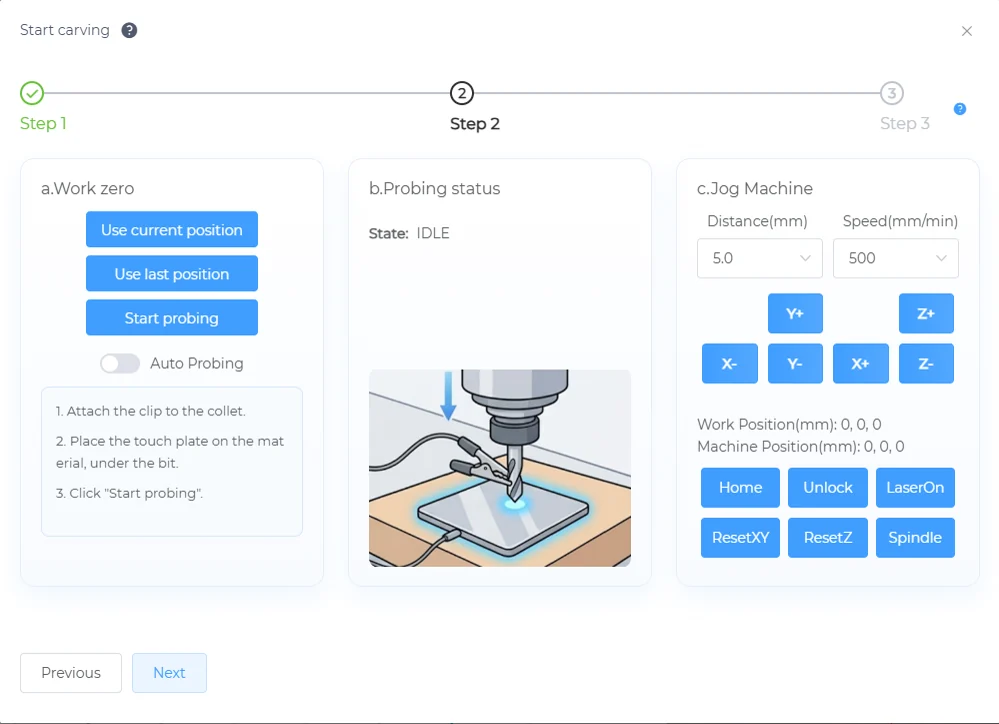
- Run a light test to confirm the cutting depth and position meet expectations.
- Tips
- After changing tools or materials, perform probing again.
How to Home the Machine
- Purpose
- Homing returns the device to its preset reference position to ensure reliable and repeatable motions.
- When to Use
- After powering on, after long periods of inactivity, or when the machine position seems abnormal.
- Steps
- Clear items around the device and along its motion path; keep channels open.
- In Laetoly’s right-side
 panel, click
  !.
!. - Do not touch the device during homing; wait for completion.
- Tips
- If homing is interrupted or fails, ensure safety conditions and try again.
How to Change Tools Safely
- Steps
- Pause or stop the current job and wait until the device fully stops.
- Use the tools provided with the device to replace the bit; work steadily and avoid excessive force.
- After replacement, check that the tool is securely fastened.
- Perform Probing again, reset the work origin if needed, and run a small test.
- Safety Reminder
- Keep the device stationary during tool changes; keep hands away from moving parts to prevent accidental movement.
How to Clear Machine Alarms
- Purpose
- Alarms are protective notifications indicating unsafe or unsuitable states.
- Steps
- Review on-screen prompts and follow instructions (e.g., confirm the door is closed, release emergency stop, remove obstructions).
- After resolving the situation, click
 to unlock.
 - If alarms persist, reconnect the device or restart the browser and try again.
- Help
- If the alarm continues, record the messages and take screenshots; submit via the feedback portal to get timely diagnosis and assistance.
- Submit issues through the feedback portal in the user center. Include your operating system and browser, device model, connection method, and any prompts displayed when the issue occurred.